Laser Engraving Machines for Gold and Jewellery: Fiber or UV? And How Many Watts?
Engraving names on rings, chains and medals has become a core service in gold and gift shops. This guide helps you choose the right machine the first time.
In this article
- 1.Fiber or UV?
- 2.How many watts do you need?
- 3.The rotary axis for rings and bracelets
- 4.Desktop, split or portable?
- 5.Colour marking
- 6.Services you can offer with an engraving machine
- 7.What do the catalogue specifications mean?
- 8.Software and engraving design
- 9.Caring for the machine
- 10.MOPA lasers and colour marking
- 11.Checklist before the machine arrives
- 12.Safety in the shop
- 13.How to price the engraving service
- 14.Where to buy an engraving machine
- 15.FAQ
Today's customer wants their name or a special date on a ring or necklace, and wants it the same day. Hand engraving is slow and needs a skilled hand, while a laser marking machine engraves with very high precision in seconds.
In this guide we explain how to choose the laser type, power and options that suit a gold or gift shop.
Fiber or UV?
| Material | Suitable type |
|---|---|
| Gold, silver, platinum | Fiber |
| Stainless, aluminium, copper | Fiber |
| Glass and crystal | UV |
| Sensitive plastics and packaging | UV |
| Wood and leather | CO2 or diode |
For gold shops, a fiber laser is the main choice. And if you have gift work on crystal and glass, you can add a UV marking machine later.
How many watts do you need?
- 20 – 30 W: marking and light engraving of names and logos on jewellery and medals.
- 50 W: deeper, faster engraving, suited to higher volumes and thicker pieces.
- 60 – 100 W: very deep engraving and cutting thin sheet, for production workshops and industrial parts.
The rotary axis for rings and bracelets
A ring is cylindrical, and engraving it needs a fixture that rotates it during engraving so the text comes out even around the whole circumference. A rotary axis is an essential option for jewellery shops, and is also used for cups and pens.
Desktop, split or portable?
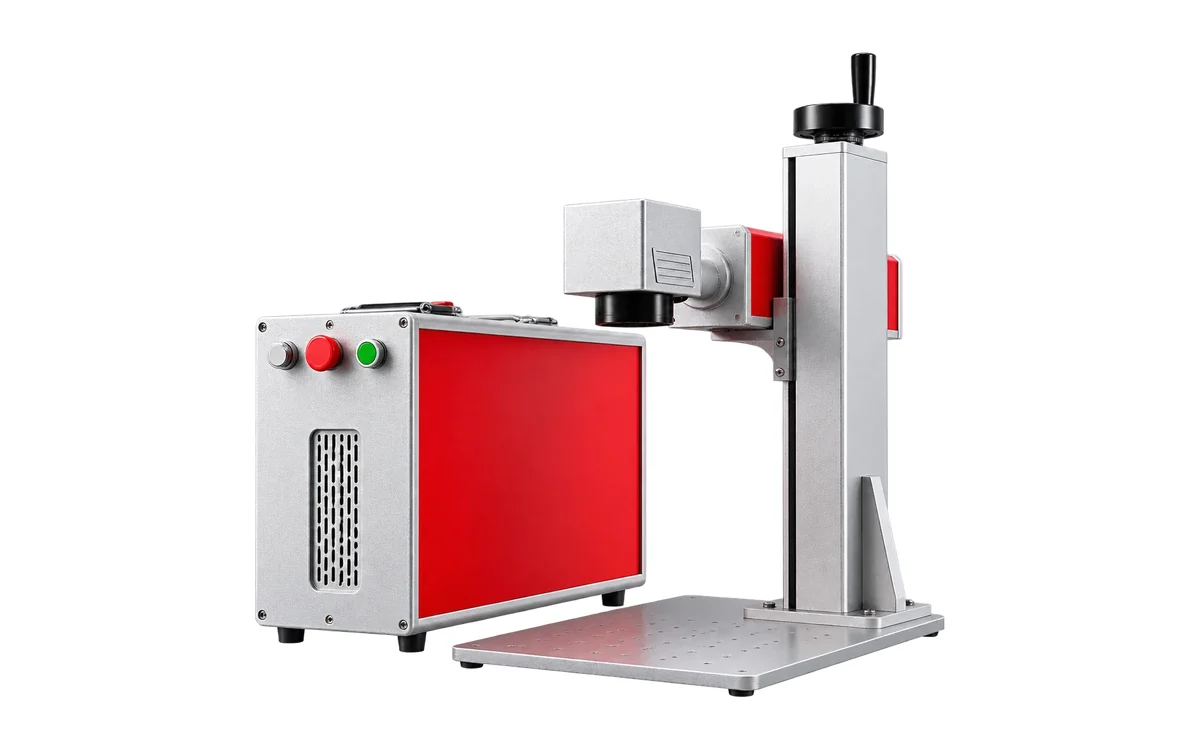
- [All-in-one desktop](/products/desktop-fiber-laser-marking-machine): everything in one unit, with a red dot pointer to set the engraving position. Suits most shops.
- [Split](/products/split-fiber-laser-marking-machine): the source is separate from the head, so you can engrave larger pieces or fit it into a production line.
- [Portable](/products/portable-fiber-laser-engraver): light (6.5 kg), suited to exhibitions and mobile selling.
Colour marking
Some fiber machines can produce colours on stainless and titanium by adjusting the laser settings, opening up distinctive gift services such as coloured medals and pens.
Services you can offer with an engraving machine
A laser engraving machine does not only serve gold shops. With the same machine you can open several income streams:
- Jewellery: names and dates on rings, bracelets, chains and medals.
- Gifts: pens, lighters, thermal mugs, metal wallets and watches, especially in Eid, graduation and National Day seasons.
- Companies: engraving logos on gifts for employees and clients, and name and office plates.
- Industry: serial numbers and barcodes on spare parts and tools, a year-round market.
- Electronics: engraving on metal phone cases and device accessories.
What do the catalogue specifications mean?
| Specification | What it means | Common value |
|---|---|---|
| Marking area (field) | The largest area you engrave without moving the part | 110×110 to 300×300 mm |
| Smallest character | The smallest legible text you can engrave | 0.1 mm |
| Line width | The fineness of the engraved line | 0.01 mm |
| Marking speed | The beam's travel speed | Up to 7000 mm/s |
| Wavelength | The laser type (fiber 1064 or UV 355 nm) | By material |
For jewellery shops, a 110×110 or 150×150 mm area covers most pieces, because they are small anyway. Larger areas help for engraving plates and industrial parts.
Software and engraving design
Marking machines run on software such as EZCAD and LightBurn, and accept common design files such as PNG and JPG images and DXF, AI and PLT vector files. You can type text in Arabic or English directly in the software, choose the font and size and preview it before engraving.
- Red dot pointer: shows the engraving position on the part before the laser fires, so you set the position precisely.
- Variable engraving: engrave serial numbers or dates that change automatically from part to part.
- Saved templates: save the settings for each material (gold, silver, stainless) so you don't repeat the tests every time.
Caring for the machine
Marking machines are among the lowest-maintenance machines, because a fiber source has a long life (catalogues quote up to 100,000 hours) and cooling is by air with no water. But watch these points:
- Clean the output lens with a dedicated cloth and alcohol when you notice dust or fingerprints.
- Keep the machine in a clean place away from dust and humidity.
- Don't block the vents, especially in small shops.
- Use a small extractor when engraving plastics or coated parts.
Details of the available models are on the laser marking machines page, and if you also want a machine that engraves and cuts wood and leather, see the fiber and diode dual laser.
MOPA lasers and colour marking
Some fiber sources of the MOPA type allow more precise control of pulse width and frequency than standard sources. This control produces colours on stainless and titanium (blue, gold, purple and more) by oxidising the surface in a controlled way, with no ink or dye.
- Suited to premium gifts, medals, pens and lighters.
- Gives a deep, clean black mark on anodised aluminium.
- Reduces heat effects on thin pieces.
Checklist before the machine arrives
- A steady table that does not shake, close to an earthed power socket.
- A computer or laptop for the engraving software.
- A set of scrap gold, silver and stainless pieces for testing.
- A rotary axis if your work is rings and bracelets.
- A simple display of engraving samples in the shop so customers can see before ordering.
At handover we train you on the software and setting the parameters for each material, so you start working from day one.
Safety in the shop
A marking laser is small but strong on the eyes. Use the dedicated safety glasses, or choose a model with a protective cover if customers and children come into the shop. And never engrave unknown materials or ones containing PVC, because their fumes are harmful.
How to price the engraving service
Engraving prices depend more on setup time than on engraving time itself. Most shops set a fixed price for simple engraving (a name or date), and a higher price for logos, images, engraving inside a ring or colour marking. For company orders in quantity, the price is per piece with a discount by volume.
- Count the time to fix the part and set up the design, not just the laser time.
- Display ready samples in the shop, because they are the biggest driver of orders.
- Offer engraving as an add-on to sales; it raises the invoice value at almost no cost.
Over time, the engraving machine becomes a steady income source in its own right, especially in the seasons.
Where to buy an engraving machine
Small engraving machines are widely sold in online stores at tempting prices, but the difference shows after purchase: who trains you on the software in Arabic? Who repairs the machine if the source or galvo fails? Who supplies the rotary axis and parts?
- Make sure there is a written warranty and support inside the Kingdom.
- Ask for a test engraving on a gold or silver piece before buying.
- Make sure the software is licensed and supports Arabic text.
- Ask about the availability of options such as the rotary axis and protective cover.
Robotech supplies engraving machines with training, warranty and support in every region.
FAQ
Yes, a fiber laser engraves gold, silver and platinum with high precision, and it is what most jewellery shops use.
Written by the Robotech CNC team
A team specialised in supplying, installing and maintaining CNC and laser machines in Saudi Arabia. On the blog we share what we learn working with workshops and factories.